issuer=DigiCert chain: leaf → intermediate → root OCSP good
nordvik.example SPF ~all 10 lookups
Baklyset Assurance · Your security, seen from outside
Everything you have online. Including what you forgot.
Your domains, certificates, mail and suppliers are the first thing others see of you, and the first thing an attacker tries. We find them, watch them every day and tell you what to fix first. An overview, not vulnerability scanning.
Most organisations have more domains and services on the internet than anyone has a complete picture of. Much of it was set up years ago, by people who have since moved on.
Before anyone tries a password, they look at what you publish: a forgotten subdomain, an expired certificate, mail that can be sent in your name, an admin page that should never have been public.
A domain registration lapses on a Tuesday. A certificate expires on a Saturday. A cloud service is deleted while its DNS record still points at it, and someone else claims the name. None of this can wait for the next audit.
art. 21(2)(e) answer=yes scan: 5 of 20 checks failing
Regulators ask for evidence.
NIS2 and the Norwegian Digital Security Act require you to manage the risk, including in your supply chain, and to be able to demonstrate it. A spreadsheet of good intentions is not evidence.
What you get
One up-to-date picture, and a list of what to do
selector1._domainkey.nordvik.example DKIM 2048-bit ok
Everything you have online, checked against what it is for
Every domain and subdomain, what each is for, who owns it and what it actually does. More than 50 checks cover mail security, certificates and TLS, DNSSEC, open zone transfers, registrar lock and expiry, takeover risks, internal server names in public DNS and outdated software. A customer portal and a domain that only redirects are held to different requirements.
We keep looking for domains you have forgotten, in public certificate logs, passive DNS and web archives. You see what we found and why, and you decide. Nothing is added or scanned until you approve it.
do first nordvik-bolig-utleie.example registration expiring high
Know what to do first
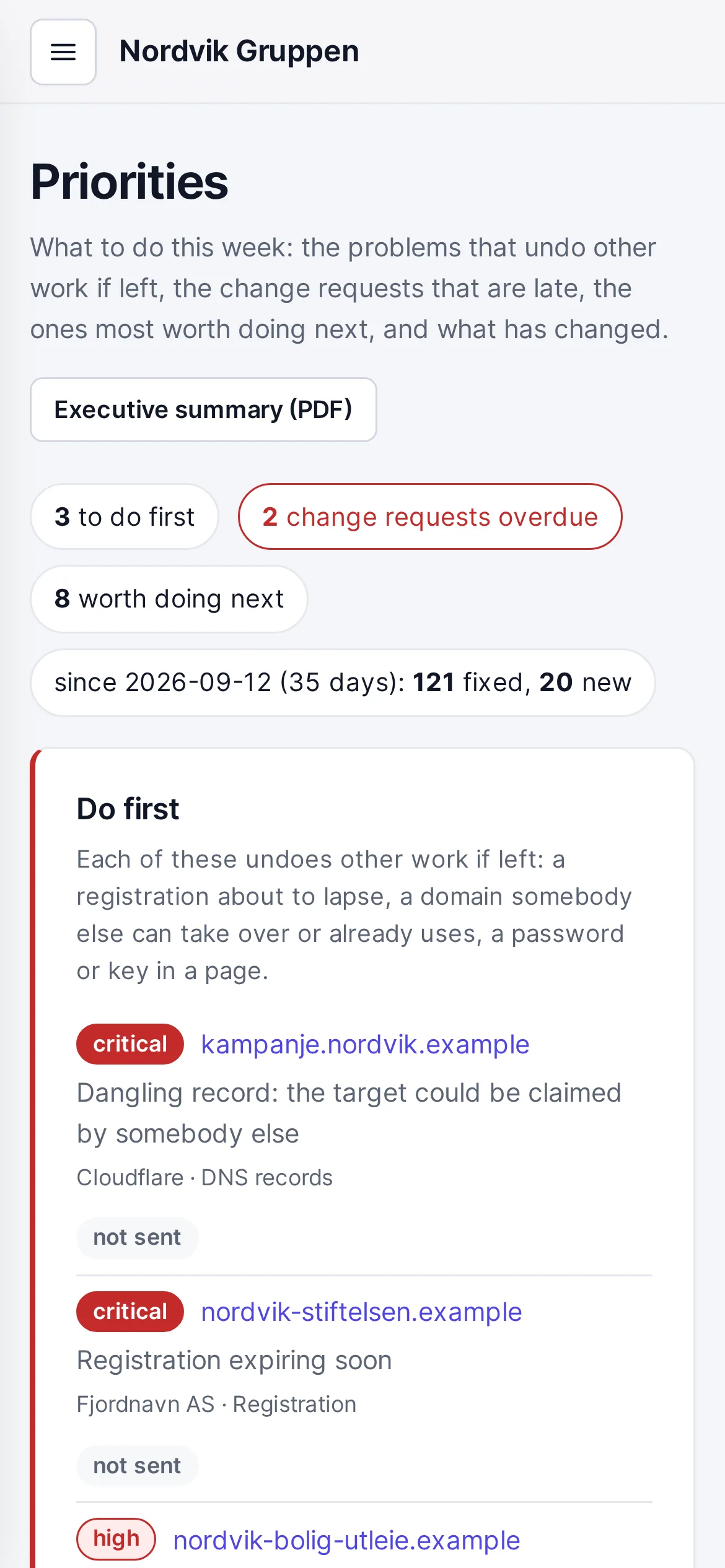
Every finding states what was seen, why it matters and which record or setting to change. Priorities is the week's worklist: the risks that undo other work at the top (the lapsing registration, the domain someone else can take over, the password in a web page), then overdue requests and what is most worth doing next.
to: drift@fjordnett.example 5 changes due 2026-11-16
Change requests that reach the right supplier
Most fixes are made by someone else: the DNS operator, the registrar, the mail platform or the web agency. Change requests groups the findings by supplier, with the steps, what can go wrong and how to roll the change back. Enter the address and press Send: the request goes out with a PDF, replies come to you, and it is followed up against the due date you set, with a reminder in one click.
*.nordvik.example SAN ×11 issuer=DigiCert renewal=manual
Every certificate in one place
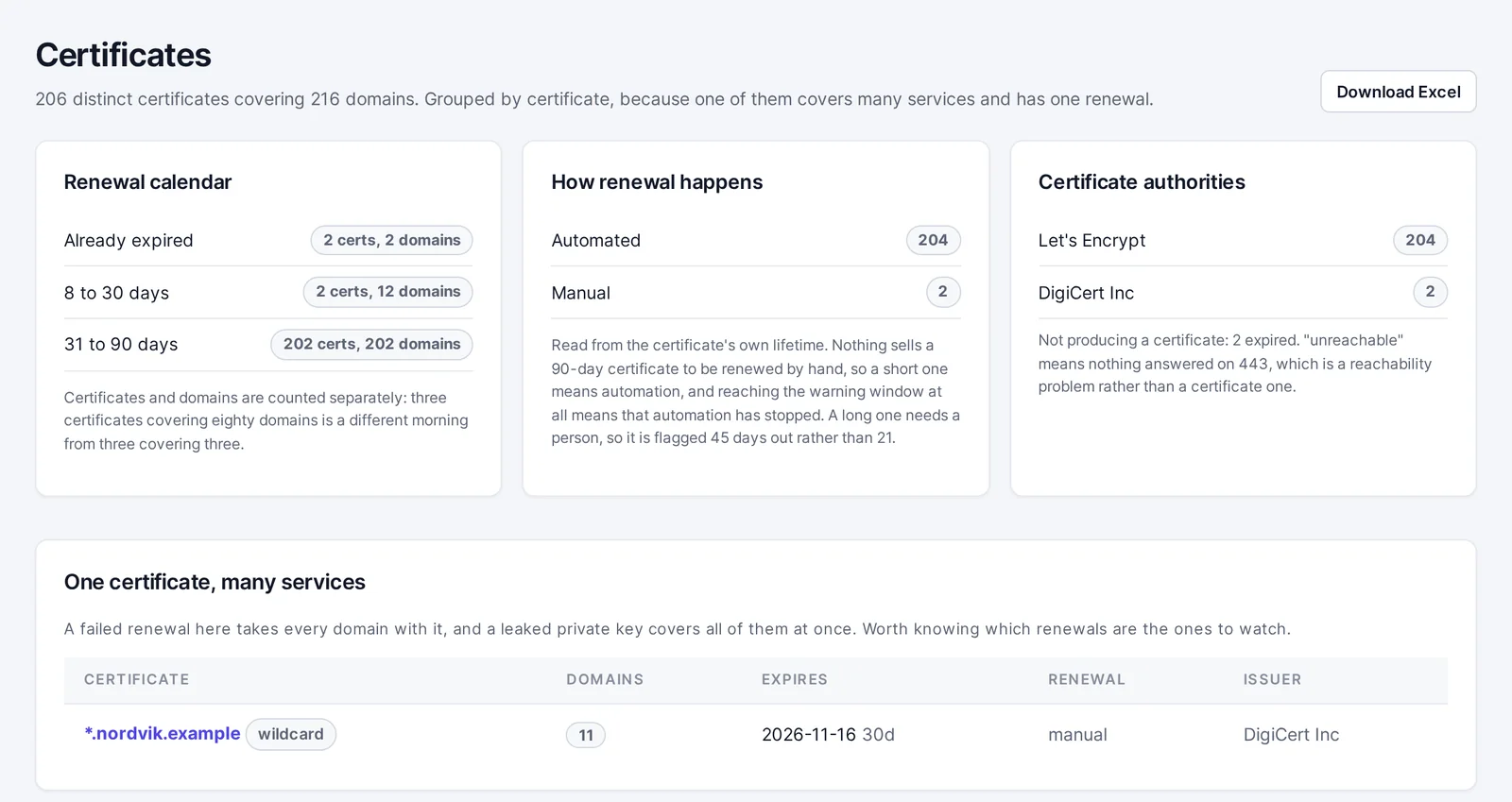
Where each certificate is used, which domains it covers, how far a wildcard reaches, when it expires and whether the authority has revoked it. Certificates renewed manually are flagged earlier than automated ones, because they need a person and a purchase. You also see certificates issued in your name by an authority you do not use.
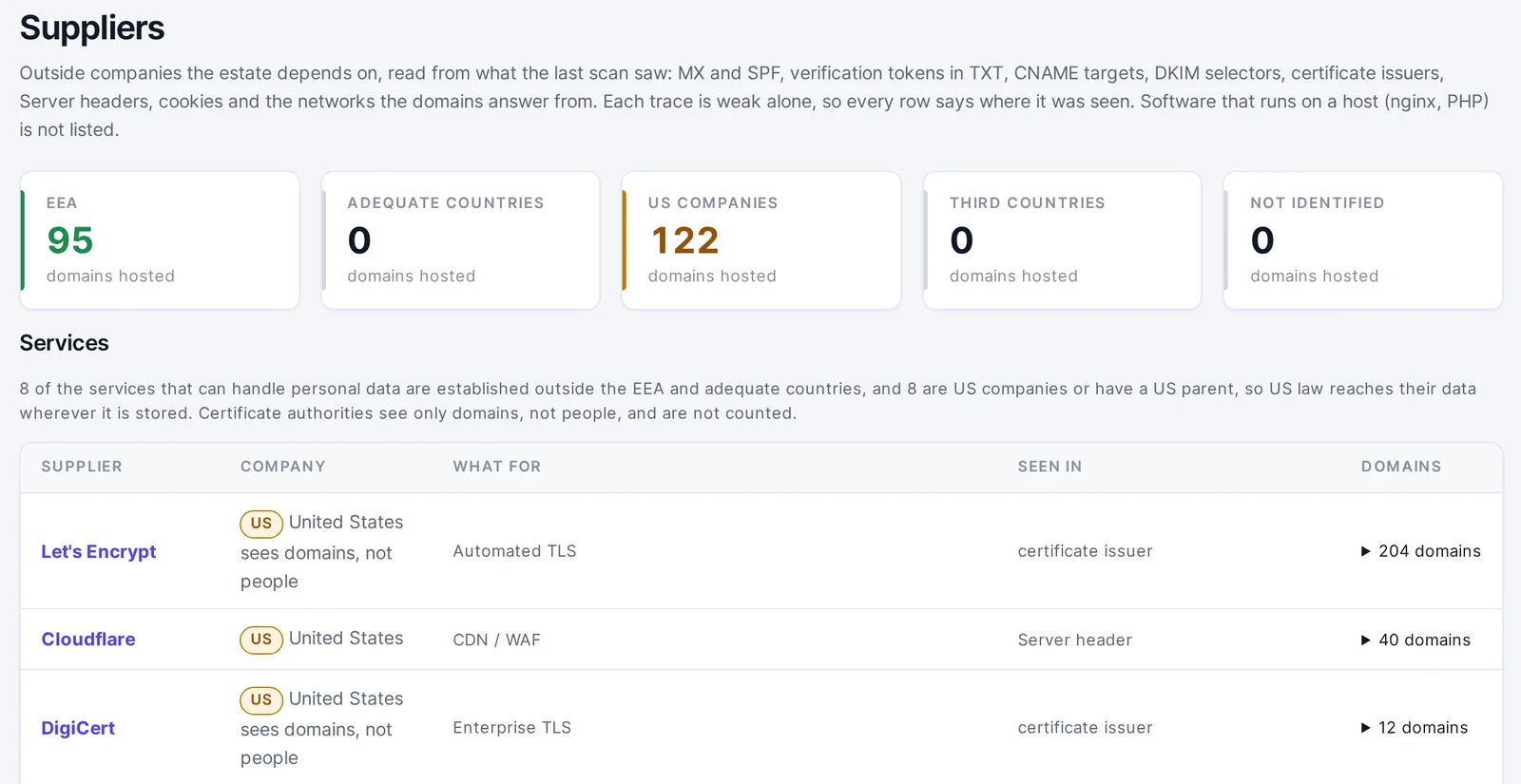
The companies you depend on for mail, hosting, CDN, SaaS and certificates, read from your own public records. For each supplier you see the country in which it is established, whether US law can reach your data, which domains it operates for you and what is exposed there. A starting point for every supplier and transfer assessment.
nis2 art. 21(2) self-assessment: 20 of 39 answered
NIS2 and NSM's basic principles, ready for the auditor
The ten measures of NIS2 Article 21(2), each with what the external view provides as evidence. 39 questions guide you through what only you can answer: who is responsible, how it is done and the document that proves it. Where your answers and the evidence disagree, you see it before the auditor does. NSM's basic principles for ICT security work the same way, and both can be exported as an editable Word report in one click.
2026-10-17 02:00 UTC 121 fixed · 20 new · 3 do first
Alerts worth reading, progress you can show
One digest per scan, only when something is new or has a deadline, by e-mail or in Teams or Slack. Each owner sees their own domains; the security team sees everything. You see what was fixed and what is new, how long each problem has been open and the trend week by week, and every decision is recorded in an audit log you can download.
breach lookup domain=nordvik.example person=none
Leaked credentials and exposure
Whether your domains appear in breach catalogues, and how many infected machines with saved credentials for your services appear in infostealer logs. We look up the domain only, never an individual. You also see the e-mail addresses your websites publish, and your own IP ranges with the open ports and known vulnerabilities already on public record. We look them up; we do not scan them.
See it
A short tour
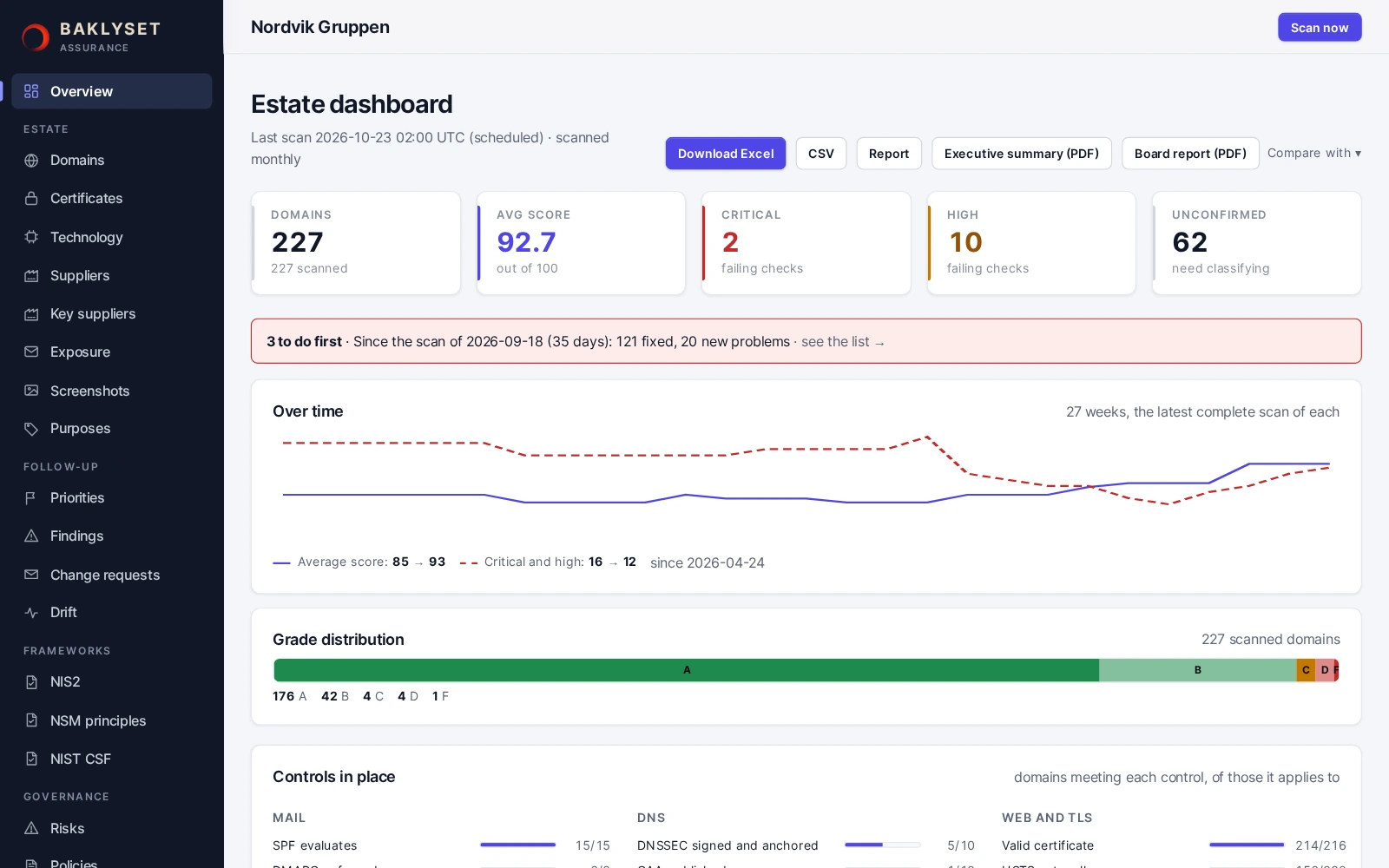
The screenshots show the demonstration: a fictional group of companies with 227 domains and six months of history.
01
Overview
A score for the whole estate, the trend week by week and what expires soon. One page to show management.
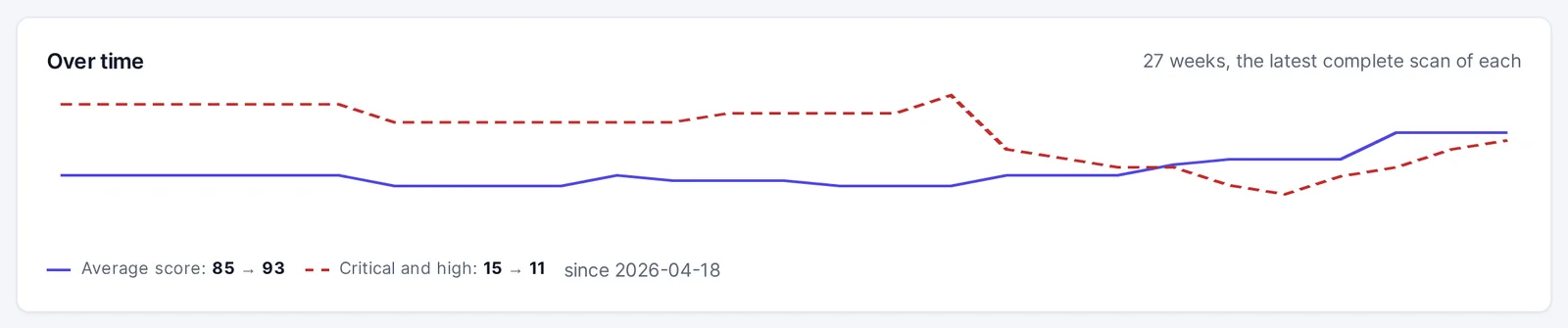
(open larger image)FIG. 01 Average score from 85 to 93 and fewer serious findings in six months.
02
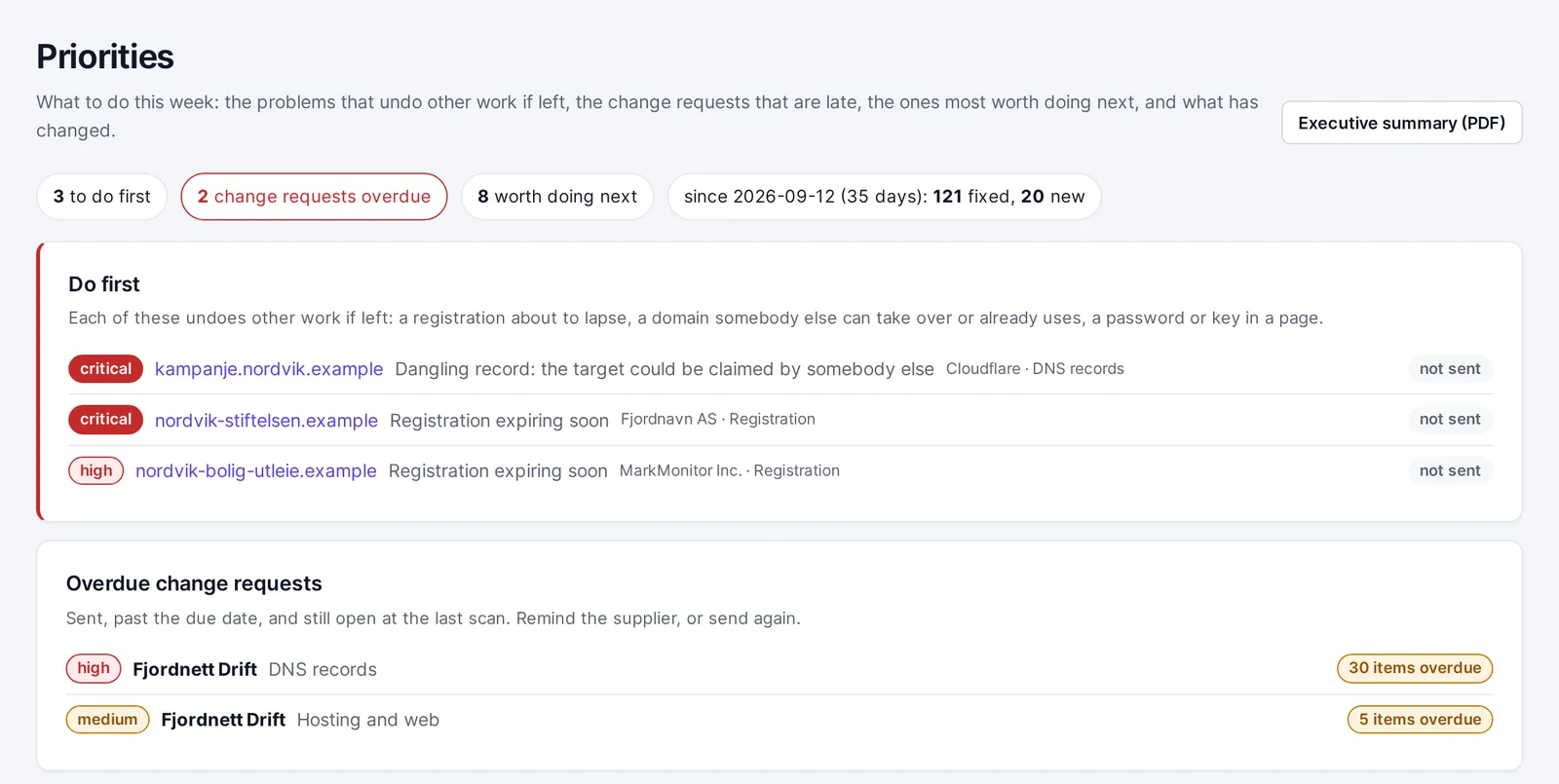
Priorities
What to do first is at the top, each item with its status: not sent, sent and due, or overdue by a number of days. Below it, the change requests that are overdue.
(open larger image)FIG. 02 What to do this week, and which change requests are overdue.
03
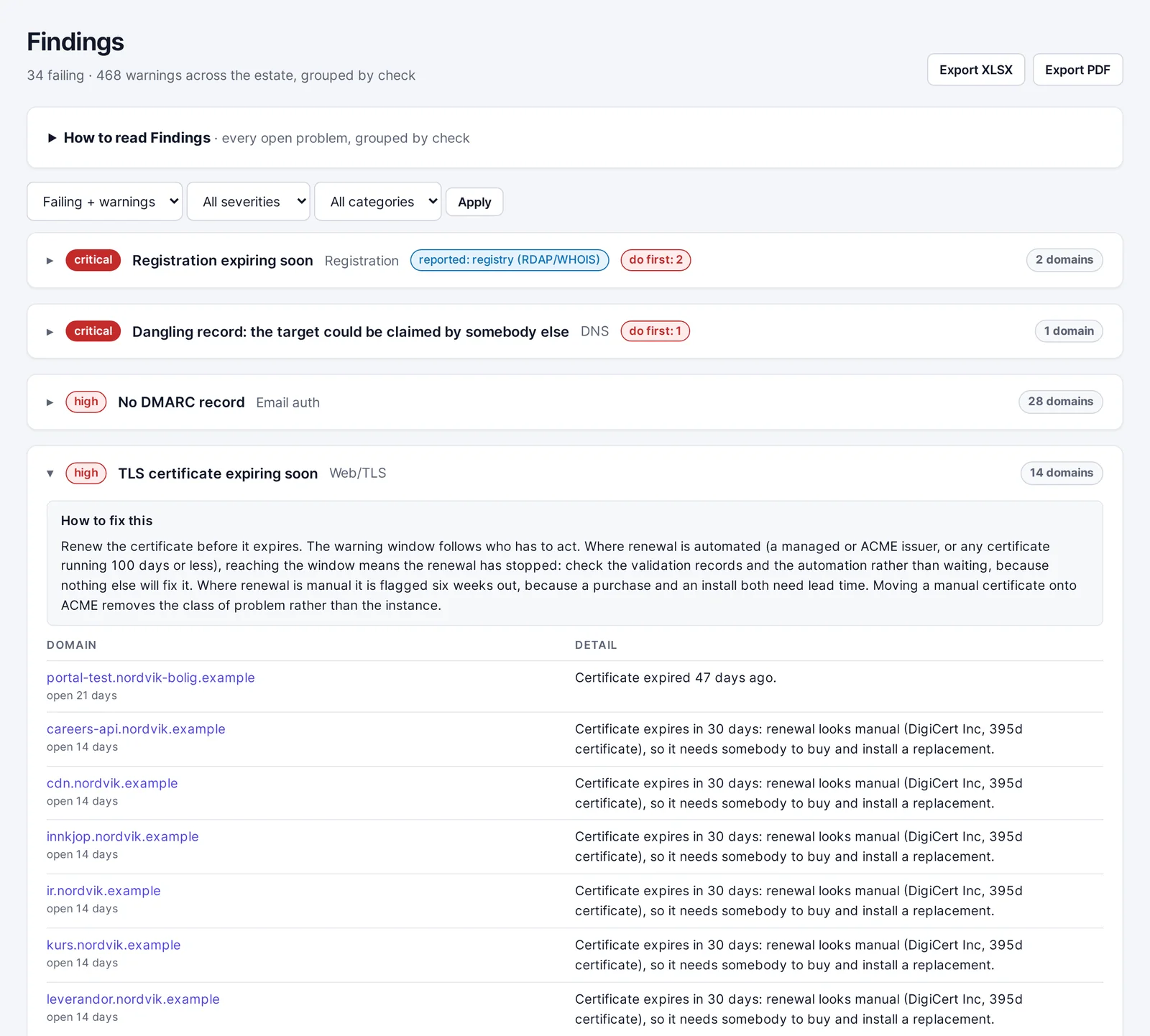
Findings
Open a finding to see what was seen, why it matters and what to change. Similar findings are grouped, so 28 domains without DMARC become one task, not 28.
(open larger image)FIG. 03 One finding, one explanation of the fix, and every domain it applies to.
04
Change requests
One e-mail per supplier, written for you, with a PDF. The next scan shows whether the job was done.
FIG. 04 One request per supplier, written for you.
05
Certificates
Every certificate with the days remaining, whether it renews automatically or manually, and where each one is installed. Manual renewals are flagged earlier.
(open larger image)FIG. 05 Every certificate in one place, with a renewal calendar and manual renewals marked.
06
Suppliers
Who you depend on, where they are established and whether US law can reach your data. Each supplier has its own page with the domains it runs for you.
(open larger image)FIG. 06 Which suppliers the domains depend on, and whose law applies to them.
Many tools turn a few external checks into a green tick for “compliant”. We do not. A failing check is evidence of a gap; a clean check means only that no gap can be seen from outside. You get findings you can defend before an auditor. It is a tool for overview and order, not a replacement for vulnerability scanning or penetration testing.
dmarc_enforced FAIL evidence="p=none"
Fewer false alarms
A firewall or WAF may block anything that looks like a scanner, including us. We do not try to get around it. You are told about the block instead of being given a grade, because what we see behind a block is rarely what the site actually serves. A timeout is “could not tell”, not “down”. And a DNS record anyone can take over is kept distinct from a stale one nobody can use.
Everything is observed from the outside, the way an attacker sees you. We hold no passwords and no DNS or registrar access, and we change nothing. Deeper checks, such as looking for exposed paths and ports, stay off until you switch them on, and the data processing agreement records this.
credentials=0 dns_write=none registrar=none
Built to be attacked
A security tool reads what attackers control: web pages, certificates and DNS. Ours treats all of it as hostile. The scanner never connects to internal addresses, reads only a bounded amount of any response and takes screenshots in a browser sealed off from your data.
connect 10.0.0.12:443 refused: private address
Every customer separate, in Norway and the EEA
Every customer has its own instance: its own database, its own process, its own sign-in. Data is stored in Norway, and e-mail is sent from France. The exception is the optional AI features: they are off until you switch them on, and then excerpts go to Anthropic (Claude) and supplier names to Brave Search in the US. Everyone signs in with a passkey or two-factor authentication, or with your own single sign-on by agreement. Everything is backed up nightly to a separate site.
instance=nordvik own db · own process · own sign-in
Built on real audit work
The checks are the same ones Baklyset uses in external security audits for clients. The difference is that they now run every day.
nightly watch 02:00 UTC · full scan monthly
Who it is for
For the people who need the picture
Security and IT leaders who need one up-to-date picture of everything visible from outside, and a list of what to fix first.
Organisations under NIS2 and the Norwegian Digital Security Act, and those reporting against NSM's basic principles, who need evidence rather than policies alone.
Groups with many brands, countries or acquisitions, where domains have accumulated faster than anyone could keep track of them.
Management and boards who want one page in plain language and the trend over time, not a snapshot.
Consultancies and auditors who want continuous evidence between engagements.
Getting started
Three steps
1
Send us your domain list
We go through it together and confirm that the domains are yours. You get named user accounts, each with the access its holder needs.
2
First view within 24 hours
Every domain is checked, forgotten domains are suggested, suppliers are mapped and findings are ranked by urgency.
3
Every day after
A nightly watch on everything with a deadline, a full scan every month, alerts when something needs a person, and a trend you can report on.
Questions
What we are often asked
Do you need access to our systems?
No. Everything is read from what your domains publish to the internet. We hold no passwords and have no access to your DNS, registrar or internal systems.
Will it disrupt our services?
No more than a visitor would. By default each domain receives some DNS lookups, a few TLS connections and a handful of ordinary web requests. Nothing is submitted, logged into or guessed. Requests come from a fixed address and identify themselves, so your operations team can recognise them.
Does it tell us whether we comply with NIS2?
No, and be wary of anything that claims to do so from an external check alone. We show what the external view provides as evidence, collect what only you can answer, and make the gaps and contradictions visible, so that you can document the work to regulators and auditors.
Where is our data?
In Norway, in a separate instance for each customer. Alert e-mails and change requests are sent through a mail service in France (Scaleway), so customer data stays in Norway and the EEA. The data processing agreement states this and lists every service we query. You get the data processing agreement and a description of our security measures, including what is not yet in place.
Do you use AI?
Only if you want it. The features that use AI are off until you switch them on in Settings, after which excerpts go to Anthropic (Claude) in the US. Without them, everything still works: findings, priorities, summaries and reports are written by the service itself.
Does this replace a vulnerability scanner?
No. It gives an overview of everything you have online and what should be tidied up, seen from the outside. It does not test your systems from the inside, and it does not find software vulnerabilities the way a vulnerability scanner or a penetration test does. Use it alongside them, not instead of them.
Do you actively test our systems?
Not without your agreement. Looking for paths that should not be public and testing a few administration and database ports are off by default, and are switched on only once you have agreed in writing. It is not a penetration test: nothing is exploited and nothing is logged into.
Can we see it before we commit?
Yes. The demonstration runs the full product on a fictional group of companies with 227 domains and six months of history. Get in touch and we will show it to you.
What does it cost?
Get in touch, and we will work it out together.
See your organisation as others see it
Send us an e-mail with your primary domain and we will take it from there. You do not need to grant us access to anything or install anything.